Faster checkouts, tighter stock, cleaner daily closings
A point of sale (POS) system with inventory, cash, card and M-Pesa payments, and live sales reporting for every outlet. Runs on web and mobile, with receipt printers, barcode scanners and cash drawers.
- Cash, card & M-Pesa
- Runs on web and mobile
- Scanner, printer & drawer ready
- Live sales for every outlet
From the till to the stockroom to the owner's phone
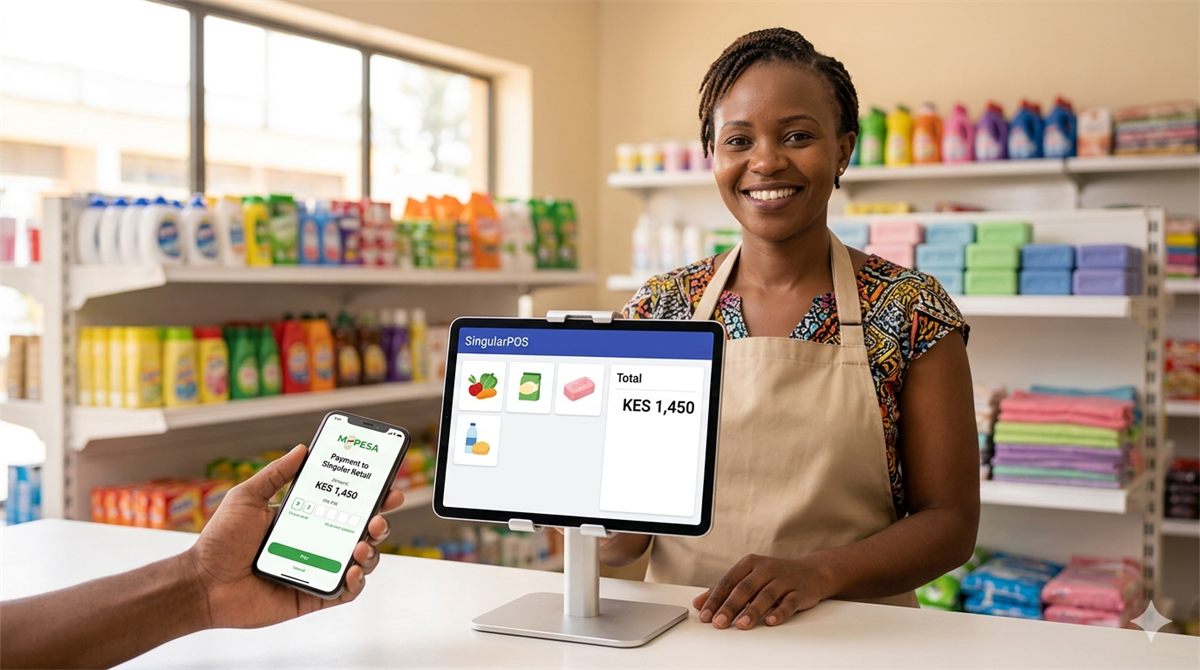
SingularERP-POS brings selling, products, stock, profits and sales analysis into one system. Cashiers ring up sales quickly with a barcode scanner and a simple screen, customers pay by cash, card or M-Pesa, and stock stays in step with what has been sold.
Owners and managers follow live sales and profit for each outlet from a laptop or a phone. Shops, supermarkets, restaurants, bars, pharmacies, agrovets and wholesalers all run on the same core, with table and kitchen orders for hospitality, and multi-location stock and route sales for distributors.
Everything in SingularERP-POS
Fast checkout
A simple selling screen that new cashiers pick up quickly.
- Scan barcodes or pick items on screen
- Cash, card and M-Pesa, or a mix in one sale
- Discounts, returns and refunds with reasons
- Printed receipts on every sale
Products & pricing
Keep your catalogue, prices and promotions in order.
- Products with categories, prices and barcodes
- Promotions set up in minutes
- Barcode labels for unlabelled items
- Import your existing product list
Inventory & stock
Know what you have, and what is running low.
- Stock updates with every sale
- Low-stock alerts and reorder levels
- Stock takes and adjustments
- Damages and write-offs tracked
Purchasing & suppliers
Restock on time and at the right cost.
- Supplier records and contacts
- Purchase orders to suppliers
- Goods received update stock
- Buying costs feed profit reports
Multiple outlets & routes
Run every branch, store and route from one system.
- Stock held per outlet and location
- Stock transfers between outlets
- Route sales for wholesalers and agrovets
- Live sales for every outlet
Restaurants & bars
Table service with tight control.
- Track tables from order to payment
- Send orders straight to the kitchen
- Keep bills open and add rounds before payment
Customers & loyalty
Turn first-time buyers into regulars.
- Customer records with purchase history
- Loyalty points to earn and redeem
- Promotions that run alongside loyalty
Tills, cash & closing
Balance every till at the end of the day.
- Opening float for each till
- Cash-up compares expected and counted cash
- Daily sales summary ready for banking
- Cashier logins with set permissions
Sales & profit reports
Live numbers for owners and managers.
- Sales by outlet, day, cashier and payment method
- Profit by product and category
- Best sellers and slow movers
- Export to Excel or PDF
Up and running in 4 steps
Add your products
Load your products, prices and barcodes, or import an existing list, and set opening stock for each outlet.
Set up outlets and tills
Create your outlets and cashier logins, and connect receipt printers, barcode scanners and cash drawers.
Start selling
Take cash, card and M-Pesa payments on the web or mobile POS from the first day.
Close and review
Close each day with a clean cash-up, then follow sales, stock and profit on live reports.
Built for businesses that sell across the counter
Retail shops & supermarkets
Sell faster, track stock and launch promotions in minutes.
Restaurants & bars
Send orders to the kitchen and keep track of every table.
Wholesalers & agrovets
Run stock across several locations and manage route sales.
Pharmacies & specialist stores
Pharmacies, wines and spirits, cosmetics and electronics get the reports they need to grow.
Works with the tools you already use
M-Pesa
Take M-Pesa payments at the till, alongside cash and card.
Card payments
Accept card payments as part of the same checkout.
Barcode scanners
Scan items straight into the sale for quick, accurate checkouts.
Receipt printers & cash drawers
Print receipts and keep cash secure at the counter.
What changes for your team
Faster checkouts
Scanning and a simple screen keep queues short, and new staff learn the till quickly.
Leaner stock
See what is selling and what is sitting on the shelf, so you buy smarter and write off less.
Cleaner closings
Clear daily sales and fewer cash variances make banking quicker.
More repeat customers
Loyalty and promotions give customers a reason to come back.
Add more as you grow
Other SingularERP products that fit naturally alongside SingularERP-POS.